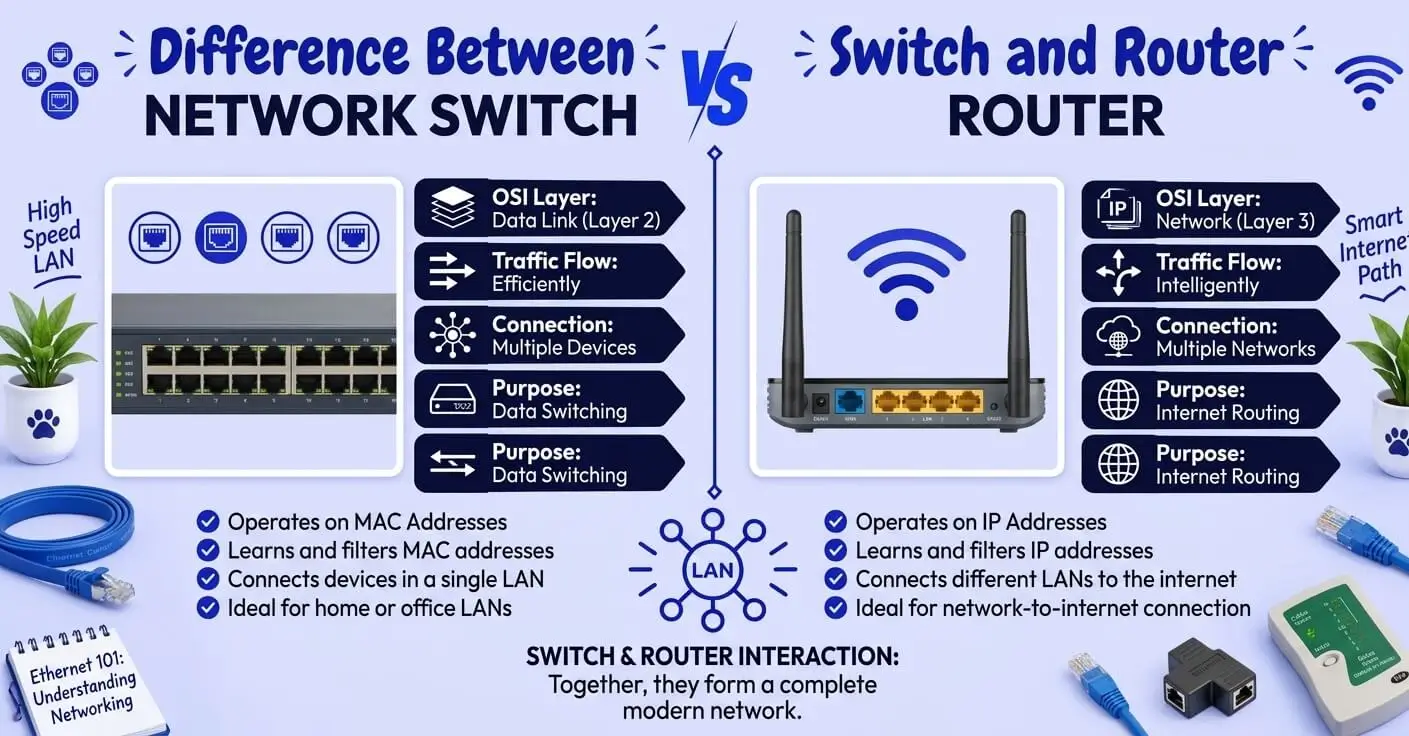
Switches and routers both move data across computer networks, but they solve different problems. A switch primarily connects devices within the same local network, while a router connects different networks and directs traffic between them. That is why a typical home or office network may use both: the router provides the connection between the local network and other networks, while a switch provides additional wired connections inside the local network.
Understanding this difference becomes easier when you look at what each device connects, which addresses it uses, and where it sits in a network.
Quick Answer
A network switch connects devices within the same network, such as computers, printers, servers, and other Ethernet devices on a local area network (LAN).
A router connects different networks, such as your home network and the internet. It forwards IP packets between networks and, on typical home networks, commonly provides functions such as NAT, DHCP, and basic firewall protection.
The simplest rule is: a switch connects devices, while a router connects networks.
Switch vs Router at a Glance
| Feature | Switch | Router |
|---|---|---|
| Main job | Connects devices within a network | Connects different networks |
| Typical layer | Layer 2 | Layer 3 |
| Main address used | MAC address | IP address |
| Typical data unit | Ethernet frame | IP packet |
| Common environment | LAN | LAN-to-WAN or network-to-network |
| Uses a routing table | No for a basic Layer 2 switch | Yes |
| Builds a MAC address table | Yes | Not its primary function |
| Internet gateway | No | Yes |
| DHCP/NAT | Usually no on a basic switch | Common on home routers |
| Extra wired ports | Yes | Often has several built-in |
| Can route between networks? | Not a basic Layer 2 switch | Yes |
| Advanced version | Layer 3 switch | Enterprise/edge router |
The table describes a typical Layer 2 Ethernet switch. Layer 3 switches add routing capabilities, so the distinction is not absolute for every networking device.
What Is a Network Switch?
A network switch is a device that connects multiple devices within a local network.
For example, an office might have:
- desktop computers
- printers
- IP cameras
- servers
- network storage
- wireless access points
A switch provides Ethernet connections for these devices and forwards local traffic toward the appropriate destination.
A basic switch learns which MAC addresses are associated with which ports. When an Ethernet frame arrives, the switch can use its MAC address table to determine where to forward that frame rather than treating every destination as the same.
Example
Suppose a desktop computer needs to communicate with a network printer on the same LAN.
The basic path may look like:
Computer → Switch → Printer
The switch handles the local Ethernet forwarding.
The router does not need to perform the local switching job simply because the devices are communicating on the same network.
What Is a Router?
A router connects different networks and determines where IP traffic should go next.
In a typical home network, the router sits between the local network and the internet service provider’s network.
The basic arrangement looks like:
Internet → Router → Local Network
A router examines destination IP information and uses routing information to forward packets toward another network. Cisco describes routing as the process of selecting paths for IP traffic within or between networks.
A home router commonly does more than routing. Depending on the device, it may also provide:
- Network Address Translation (NAT)
- DHCP
- firewall functions
- Wi-Fi access
- Ethernet switching
- VPN features
This is one reason the distinction can seem confusing: a single consumer device can contain several networking functions.
What Is the Difference Between a Switch and a Router?
The fundamental difference is what each device connects.
A switch connects devices within a network.
A router connects different networks.
For example, imagine an office network containing 20 computers.
The switch can connect those computers to the same LAN:
PC → Switch → PC
But when a computer needs to communicate with a destination outside the local network, the traffic normally goes through the router:
PC → Switch → Router → Other Network
This distinction is more useful than memorizing “switch = Layer 2” and “router = Layer 3,” although those OSI-layer descriptions are important technical details.
Switch vs Router: Layer 2 and Layer 3
A traditional Ethernet switch primarily operates at Layer 2, the Data Link layer, while a router primarily operates at Layer 3, the Network layer.
Layer 2: Switch
A basic switch primarily works with Ethernet frames and MAC addresses.
It answers a question like:
Which local device should receive this Ethernet frame?
Layer 3: Router
A router works with IP packets and routing information.
It answers a question like:
Which network should this packet go to next?
This distinction is a useful foundation, but modern networking includes Layer 3 switches that can perform routing as well.
MAC Address vs IP Address
Another important difference is the type of addressing involved.
Switch: MAC Address
A switch uses MAC addresses for normal Layer 2 forwarding.
A MAC address identifies a network interface at the Ethernet/Data Link level.
The switch can build a table associating MAC addresses with physical ports.
Router: IP Address
A router uses IP addresses when making Layer 3 forwarding decisions.
For example, if traffic is destined for another IP network, the router consults its routing information and determines the appropriate next hop.
So a useful memory rule is:
Switch → MAC → local Ethernet forwarding
Router → IP → network-to-network routing
When to Use a Switch
Use a switch when you need to connect more wired devices to an existing local network.
For example, suppose your router has four available Ethernet ports, but you need wired connections for:
- a desktop
- a smart TV
- a printer
- a game console
- a network storage device
- an additional computer
A separate Ethernet switch can provide additional ports.
The typical arrangement is:
Router → Switch → Multiple Wired Devices
A switch is also widely used in business networks where many computers, servers, phones, cameras, and access points need Ethernet connectivity.
Managed switches can additionally provide functions such as VLANs and other network-management features.
When to Use a Router
Use a router when you need to connect different networks.
The most familiar example is connecting your local network to the internet.
For a home network:
ISP/Internet → Router → Home Devices
The router acts as the network’s gateway to other networks.
A home router may also provide DHCP, which automatically gives local devices IP addresses, and NAT, which allows multiple private devices to share a public internet address.
Do You Need Both a Switch and a Router?
Often, yes—but not necessarily as two separate physical boxes.
Most home routers already include several Ethernet switch ports. In other words, the device sitting on your desk may combine:
- routing
- Ethernet switching
- Wi-Fi access-point functionality
- DHCP
- NAT
- firewall features
That is why you can plug a laptop into a home router and access the internet without purchasing a separate switch.
You may add a separate switch when you need more wired ports or want to organize a larger Ethernet network.
Typical Home Setup
Internet
↓
Router
↓
Switch
↓
PCs / TV / Printer / NAS / Cameras
The router handles the connection between networks, while the switch expands the local wired network.
Can a Switch Replace a Router?
A basic Layer 2 switch cannot replace a router for normal internet connectivity.
A basic switch does not perform the network-to-network routing functions that a router provides. It can connect devices within an existing network, but it does not normally act as the gateway between your LAN and the internet.
There is an important exception: Layer 3 switches can perform IP routing.
That does not mean every Layer 3 switch is a complete replacement for an internet-edge router. Layer 3 switches are commonly optimized for internal routing between VLANs or subnets, while routers or dedicated edge devices may provide WAN connectivity, NAT, VPN termination, firewalling, or other edge functions.
What Is a Layer 3 Switch?
A Layer 3 switch combines traditional switching with IP-routing capabilities.
It can therefore do more than a basic Layer 2 switch.
For example, an enterprise network may have separate VLANs for:
- employees
- guests
- servers
- security devices
A Layer 3 switch can route traffic between those internal networks.
This is where the simple statement “switches operate at Layer 2 and routers operate at Layer 3” becomes incomplete. A Layer 3 switch performs both Layer 2 switching and Layer 3 routing.
However, the exact capabilities vary by device. A Layer 3 switch is not automatically equivalent to an edge router with all WAN, NAT, VPN, and security functions.
Common Real-World Examples
Example 1: Connecting More Computers
You have one router but need eight wired Ethernet connections.
Use a switch.
The switch expands the number of wired connections within the existing network.
Example 2: Connecting Your Home to the Internet
You have an internet connection from an ISP and need your home devices to access it.
Use a router or an ISP gateway with routing functionality.
The router provides the network boundary and routes traffic toward the internet.
Example 3: Connecting a Printer to Several Computers
The computers and printer are already part of the same LAN.
A switch can connect them.
Example 4: Connecting Separate VLANs
Your organization has separate internal VLANs and needs communication between them.
A Layer 3 switch may provide the required inter-VLAN routing.
Example 5: Connecting an Office to the Internet
An office needs to connect its internal LAN to an ISP or WAN service.
A router or appropriate edge-routing/security device is typically involved.
Common Mistakes With Switches and Routers
Incorrect:
A switch connects to the internet, so it does the same thing as a router.
Correct:
A basic switch connects devices within a network, while a router connects different networks.
Why:
The two devices can both participate in moving network traffic, but their normal roles are different.
Incorrect:
Every switch is only Layer 2.
Correct:
Basic Ethernet switches are commonly Layer 2 devices, but Layer 3 switches can also perform routing.
Why:
Layer 3 switching adds IP-routing capabilities to switching hardware.
Incorrect:
A router and switch are always separate physical devices.
Correct:
A single consumer networking device can combine routing, switching, Wi-Fi, and other functions.
Why:
Home routers commonly include Ethernet switching and wireless access-point functionality.
Common Collocations With Switch and Router
Phrases with “switch”
- network switch
- Ethernet switch
- managed switch
- unmanaged switch
- Layer 2 switch
- Layer 3 switch
- switch port
- switch configuration
- switch VLAN
- network switch ports
Phrases with “router”
- network router
- wireless router
- home router
- edge router
- router configuration
- routing table
- router IP address
- router firewall
- router gateway
- broadband router
These combinations reflect how the terms are normally used in networking contexts.
Can a Router Replace a Switch?
This question requires more nuance.
A typical home router already has multiple Ethernet switch ports, so it can provide basic switching functionality for the devices plugged into those ports.
However, a router is not necessarily the best substitute for a dedicated switch in a larger network.
If you need many Ethernet ports, VLAN functionality, Power over Ethernet (PoE), or specialized switching features, a dedicated switch may be appropriate.
So:
Router with built-in switch ports → enough for many home networks
Dedicated switch → useful when the local network needs more ports or advanced switching capabilities
Are Switches and Routers the Same?
No.
They overlap in the broader job of moving network traffic, but their traditional roles are different.
A switch primarily handles communication within a local network.
A router handles communication between different networks.
Modern devices can combine functions, and Layer 3 switches blur the technical boundary, but that does not make the terms interchangeable.
How to Remember the Difference
Use this simple rule:
Switch = connects devices.
Router = connects networks.
Think about a small office.
The switch connects the computers, printer, cameras, and other local devices.
The router connects that office network to other networks, such as the internet.
If you remember device-to-device versus network-to-network, the basic distinction becomes much easier.
Which One Should I Use?
The right choice depends on what you need your network device to do.
A switch is the right option when you need additional Ethernet ports for devices that are already connected to the same local network.
Choose a router when the goal is to connect your local network to the internet or to another network.
For communication between different VLANs or subnets, a Layer 3 switch can provide the necessary routing functionality.
In a typical home network, a router or an ISP gateway with routing capabilities is usually needed to connect your devices to the internet.
When your existing router does not provide enough Ethernet ports, adding a switch is a simple way to expand the number of wired connections.
Switch or Router? Practice Examples
Choose switch or router for each situation.
- You need to connect six computers within the same office LAN.
- You need to connect your home network to the internet.
- You need four additional Ethernet ports.
- You need to forward traffic between two different IP networks.
- You need to connect a printer and several PCs on the same LAN.
- You need routing between several internal VLANs.
Answers
- Switch
- Router
- Switch
- Router
- Switch
- Layer 3 switch or another routing device, depending on the network design
Frequently Asked Questions
What is the main difference between a switch and a router?
A switch primarily connects devices within the same network, while a router connects different networks and forwards IP traffic between them.
Is a switch or router needed for internet access?
A network needs a routing function to connect a local network to the internet. A basic Ethernet switch alone does not provide that function.
Do I need both a switch and a router?
You may. A typical home router already contains several switch ports, so you may not need a separate switch. You can add one when you need additional wired connections or more advanced switching functionality.
Can a switch replace a router?
A basic Layer 2 switch cannot replace a router for normal internet connectivity. A Layer 3 switch can perform routing in certain network designs, particularly between internal VLANs, but it does not necessarily provide all the WAN, NAT, VPN, and security functions of an edge router.
Does a switch use MAC addresses?
Yes. A traditional Layer 2 Ethernet switch uses MAC addresses to make local forwarding decisions and maintains a MAC address table.
Does a router use IP addresses?
Yes. Routers use IP addressing and routing information to determine how traffic should move between networks.
What is the difference between Layer 2 and Layer 3?
Layer 2 is associated with data-link functions such as Ethernet frames and MAC addresses. Layer 3 is associated with network-layer functions such as IP addressing and routing.
Is a Layer 3 switch a router?
A Layer 3 switch includes routing capabilities, so it can perform some functions traditionally associated with routers. However, its feature set and intended role can differ from a dedicated router, particularly at the WAN or internet edge.
Conclusion
The difference between a switch and a router comes down to their primary jobs. A switch connects devices within the same network, while a router connects different networks and directs IP traffic between them. A switch is useful when you need more local Ethernet connections, while a router is essential for connecting a local network to other networks such as the internet.
The easiest rule to remember is:
Devices within a network → switch.
Networks connecting to other networks → router.