
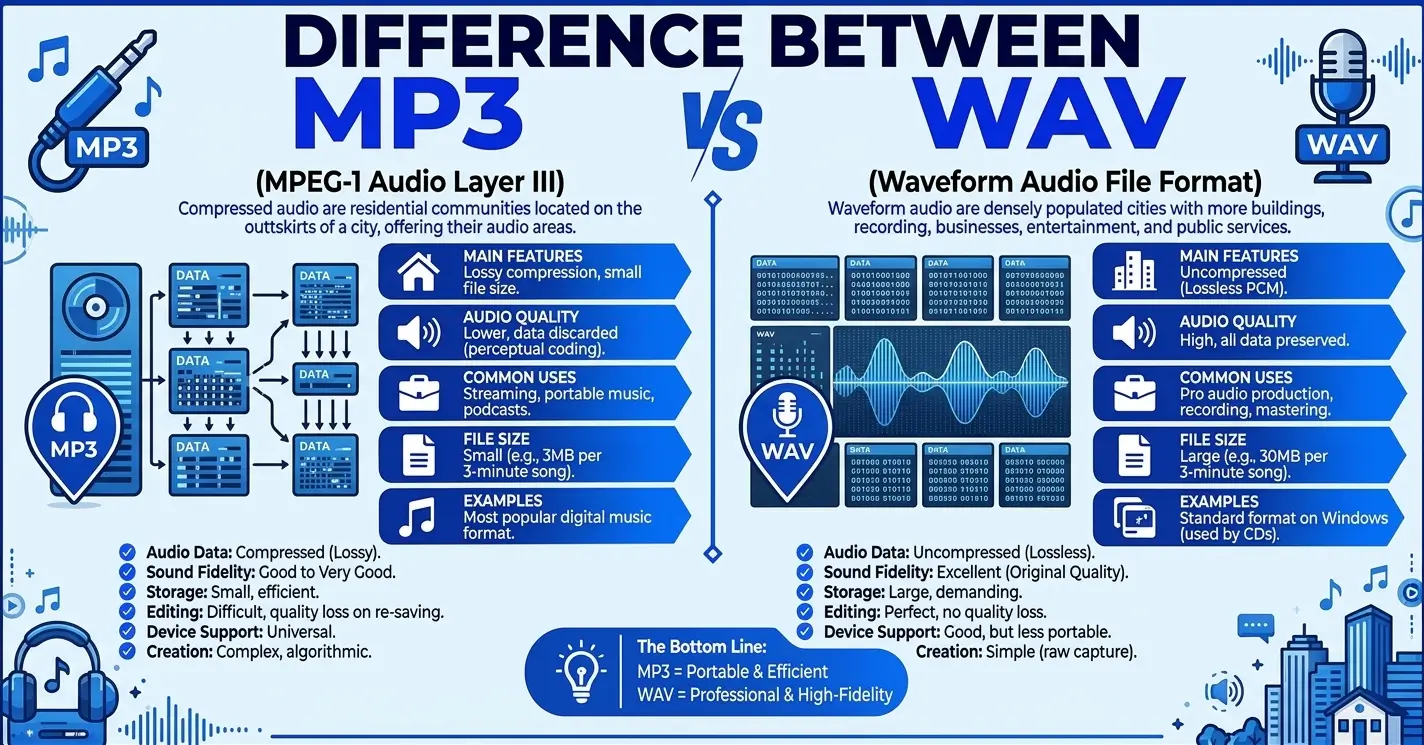
MP3 and WAV are two common ways of storing digital audio, but they are designed around different priorities. MP3 uses lossy compression to make audio files much smaller, while WAV is commonly used to store uncompressed PCM audio for recording, editing, production, and high-quality source files.
The important difference is not simply that one is “better.” It is about what you need to do with the audio. MP3 is convenient when file size and easy sharing matter. WAV is generally more appropriate when you need a high-quality working source for editing, mixing, mastering, or production.
Quick Answer
MP3 is a lossy compressed audio format that reduces file size by discarding some audio information. WAV is a file format/container commonly used for uncompressed PCM audio, so WAV files are usually much larger and preserve the source audio without an additional lossy-compression step.
In practical terms, use WAV when you need to record, edit, mix, or keep a high-quality working copy; use MP3 when you mainly need a small, convenient file for listening, sharing, or delivery.
MP3 vs WAV at a Glance
| Feature | MP3 | WAV |
|---|---|---|
| What it is | MPEG Layer III audio encoding/file format | Waveform Audio File Format/container |
| Compression | Lossy | Commonly uncompressed PCM |
| File size | Small | Large |
| Audio data | Some information is discarded | PCM source can be preserved without lossy encoding |
| Bitrate | Usually specified, such as 128 or 320 kbps | Determined largely by sample rate, bit depth, and channels when using PCM |
| Editing | Less suitable as a production source | Well suited to editing and production |
| Sharing | Convenient | Less convenient because of size |
| Streaming/delivery | Commonly suitable | Often unnecessarily large |
| Best use | Listening, sharing, compact delivery | Recording, editing, mixing, mastering, production |
| Quality after conversion | MP3 remains lossy | WAV does not restore information already lost in an MP3 |
Technical note: WAV itself does not guarantee lossless audio. It is a container that can hold different types of audio data, although uncompressed PCM is the dominant use case.
What Is MP3?
MP3 stands for MPEG-1 Audio Layer III and is a lossy audio encoding format. It was designed to make digital audio considerably smaller while retaining acceptable perceived sound quality.
MP3 uses perceptual coding. In simplified terms, the encoder analyzes the audio and reduces or removes information that is considered less important to human hearing. The discarded information cannot be recovered later.
That trade-off is what makes MP3 useful.
A smaller file means:
- less storage space
- faster transfers
- easier sharing
- lower bandwidth requirements
- convenient playback on many devices
MP3 files can use different bitrates. Common examples include 128 kbps, 192 kbps, 256 kbps, and 320 kbps. Higher bitrate generally allows more audio information to be retained, although bitrate alone does not determine perceived quality.
Example
A 128 kbps MP3 is dramatically smaller than an equivalent uncompressed CD-quality WAV. The Library of Congress notes that a 128 kbit/s MP3 can be about one-eleventh the size of an uncompressed LPCM file at 44.1 kHz/16-bit CD-quality settings.
What Is WAV?
WAV, short for Waveform Audio File Format, is a format developed by Microsoft and IBM for storing audio data. It is based on the RIFF format. Most WAV files use linear PCM, although the WAV container can support other encodings as well.
When a WAV file contains uncompressed PCM audio, it preserves the samples without applying an additional lossy compression process.
This makes WAV particularly useful for:
- recording
- audio editing
- mixing
- mastering
- sound design
- video production
- professional audio workflows
- high-quality source files
The disadvantage is size.
For example, stereo PCM audio at 44.1 kHz and 16 bits requires roughly 1,411 kbps of raw audio data before file overhead, which is much larger than a typical MP3 bitrate.
What Is the Difference Between MP3 and WAV?
The central difference is how the audio data is represented and what the format is optimized for.
MP3 is designed to reduce file size through lossy compression. WAV is commonly used to hold uncompressed PCM audio.
That creates several practical differences:
1. Compression
MP3 compresses audio and permanently removes some information.
WAV commonly stores PCM without lossy compression.
2. File Size
MP3 files are much smaller.
WAV files are much larger because uncompressed PCM requires substantially more data.
3. Editing
WAV is generally preferable as a working source for editing and production.
MP3 has already undergone lossy compression, so it is not the ideal source when substantial processing or repeated encoding is expected.
4. Delivery
MP3 is convenient for sharing and distribution because the files are small.
WAV can be unnecessarily large when the recipient only needs to listen to the audio.
5. Conversion
Converting an MP3 into WAV does not restore the audio information removed when the MP3 was encoded. It only places the existing decoded audio into a different file format.
MP3 vs WAV Sound Quality
This is where the comparison becomes more nuanced.
It is technically correct that an uncompressed PCM WAV can preserve more information than a lossy MP3. But it does not follow that every listener will always hear a dramatic difference between the two.
The audible difference depends on factors such as:
- MP3 bitrate
- encoder quality
- original recording
- music or speech content
- playback equipment
- listening environment
- listener sensitivity
- subsequent processing
A high-bitrate MP3 can sound very close to its source in ordinary listening conditions. At lower bitrates, compression artifacts can become easier to notice.
Therefore, avoid the simplistic rule:
“WAV always sounds better.”
A better rule is:
WAV gives you a less-compressed source to work with; MP3 gives you a smaller file for convenient playback and delivery.
MP3 vs WAV File Size
File size is one of the most obvious differences.
A typical uncompressed stereo WAV at CD-quality settings uses about 1,411 kbps of raw audio data. An MP3 might use 128, 192, 256, or 320 kbps.
For a three-minute stereo track, a rough comparison might look like this:
| Format | Approximate size |
|---|---|
| WAV, 44.1 kHz/16-bit stereo | About 30–32 MB |
| MP3, 128 kbps | About 3 MB |
| MP3, 256 kbps | About 6 MB |
| MP3, 320 kbps | About 7 MB |
These are approximations rather than universal values. Actual WAV size depends on sample rate, bit depth, channel count, and duration; MP3 size depends on bitrate, encoding mode, and duration.
MP3 Bitrate and WAV
Bitrate is especially important when discussing MP3.
A higher MP3 bitrate generally means that the encoder has more data available to represent the audio. Common MPEG-1 MP3 bitrates include 128, 192, 256, and 320 kbps. Variable-bitrate encoding is also supported.
WAV is different because a PCM WAV’s data rate is determined by factors such as:
Sample rate × bit depth × number of channels
For example:
44,100 samples/second × 16 bits × 2 channels = 1,411,200 bits/second
That is approximately 1,411 kbps.
This is why comparing “320 kbps WAV” with “320 kbps MP3” can be misleading. A PCM WAV’s data rate is not normally described in the same way as an MP3’s perceptual-compression bitrate.
When to Use MP3
Use MP3 when convenience and compact file size are important.
MP3 is useful for:
- sharing music
- sending audio through messaging or email
- downloadable audio
- general listening
- keeping many recordings on limited storage
- previews
- situations where the recipient simply needs to listen
- websites or workflows where a small file is preferable
For example, if you are sending someone a short voice recording and they only need to hear it, an MP3 can be much more practical than a large WAV.
When to Use WAV
Use WAV when the audio will continue through a production or editing workflow.
WAV is useful for:
- recording
- editing
- mixing
- mastering
- sound design
- video post-production
- transferring audio between production applications
- keeping a high-quality working source
Adobe similarly describes WAV as a format commonly used by video and audio editors, while MP3 is suited to smaller files and streaming-oriented uses.
If you are producing a song and expect to edit the recording several times, keeping an appropriate lossless working source is much safer than making an MP3 your only master.
MP3 and WAV in Real-World Situations
Recording a song
Choose WAV when you are recording for later editing, mixing, or mastering.
Sending a song to a friend
Choose MP3 if the person simply needs a convenient file to listen to.
Editing a podcast
Prefer a lossless source such as WAV when available.
Uploading a final preview
MP3 may be appropriate when small size and convenient playback matter.
Producing a video
A production workflow will commonly use WAV or another suitable uncompressed/lossless source during editing and mixing.
Archiving audio
WAV can be an appropriate master format, but FLAC is also worth considering because it provides lossless compression and can substantially reduce storage requirements compared with uncompressed WAV.
Common Collocations With MP3 and WAV
MP3 phrases
- MP3 file
- MP3 audio
- MP3 format
- MP3 player
- MP3 download
- MP3 bitrate
- MP3 compression
- MP3 recording
- 320 kbps MP3
- convert to MP3
WAV phrases
- WAV file
- WAV audio
- WAV format
- WAV recording
- WAV export
- WAV audio file
- WAV master
- WAV sample
- WAV recording
- convert to WAV
Common Mistakes With MP3 and WAV
Mistake 1: Assuming WAV is always lossless
Incorrect:
Every WAV file is automatically lossless.
Correct:
WAV commonly contains uncompressed PCM audio, but the WAV container can support other encodings too.
Why: WAV describes a file format/container rather than guaranteeing one specific encoding.
Mistake 2: Converting MP3 to WAV to “restore” quality
Incorrect:
I converted my MP3 to WAV, so now it has the original audio quality.
Correct:
Converting MP3 to WAV changes the container/representation, but it does not restore information discarded during MP3 compression.
Why: Lossy MP3 encoding removes or reduces audio information. Converting the result to WAV cannot recreate information that no longer exists.
Mistake 3: Thinking a larger file must sound better
Incorrect:
The WAV is larger, so it must always sound better.
Correct:
A larger file does not automatically mean a better source.
Why: File size depends on encoding parameters and the history of the audio. A WAV made by converting an MP3 can be large while still containing only the information present in the original MP3.
Mistake 4: Editing and repeatedly exporting a lossy file
Repeatedly re-encoding an already compressed MP3 can introduce additional quality loss.
When a suitable lossless source is available, it is generally better to make edits from that source and create the MP3 delivery copy afterward.
Can MP3 and WAV Be Used Interchangeably?
Sometimes, but not for every purpose.
If someone simply needs to listen to an audio file, either format may work depending on the software and workflow.
However, they are not interchangeable when the workflow requires:
- minimizing file size
- preserving an appropriate working source
- repeated editing
- production-quality transfer
- avoiding additional lossy encoding
A useful rule is:
Use the lossless/working source for production; use MP3 when compact delivery is the priority.
Does Converting MP3 to WAV Improve Quality?
No.
Converting an MP3 to WAV can be useful if a particular application requires WAV, but it does not recover the information discarded during MP3 encoding. Adobe also explicitly notes that converting an existing MP3 to WAV does not restore lost audio data.
Think of it this way:
Original audio → MP3 → WAV
The final WAV can be larger than the MP3, but it cannot magically contain the information that the MP3 encoding already removed.
For quality preservation, the better workflow is:
Original/lossless source → WAV for production → MP3 for final delivery
How to Remember the Difference
Use this simple rule:
WAV = Work
MP3 = Portable
This is not a technical definition, but it is a useful memory aid.
- WAV: think work, recording, editing, production
- MP3: think portable, compact, sharing, listening
Which One Should I Use?
Use this decision guide:
For recording or editing audio → WAV
For mixing or mastering → WAV or another appropriate lossless format
When sending a small audio file → MP3
For ordinary listening and sharing → MP3
When you need a high-quality production source → WAV
When storage space is limited → MP3
For lossless compression with smaller storage requirements → consider FLAC
The key question is not:
“Which format is better?”
Instead, ask:
“What do I need the audio format to do?”
WAV is generally suited to production and editing, MP3 is practical for compact everyday sharing and listening, and FLAC can provide lossless audio with less storage space than WAV.
“What am I going to do with this audio next?”
MP3 or WAV? Practice Examples
Choose MP3 or WAV for each situation.
- You are recording vocals that you will mix later.
- You want to send a small music file to a friend.
- You are editing sound effects for a video.
- You need a compact file for everyday listening.
- You are keeping a high-quality working source for future editing.
- You want to send a long recording where file size matters.
Answers
- WAV — the recording will be processed later.
- MP3 — compact delivery is convenient.
- WAV — production and editing benefit from a suitable lossless source.
- MP3 — small size and convenient playback are priorities.
- WAV — it is commonly used as a high-quality working source.
- MP3 — the much smaller file is easier to transfer.
Frequently Asked Questions
What is the main difference between MP3 and WAV?
MP3 uses lossy compression to reduce file size, while WAV is commonly used for uncompressed PCM audio. MP3 is generally more convenient for delivery and sharing, while WAV is commonly preferred for recording and production workflows.
Is WAV better quality than MP3?
A WAV containing uncompressed PCM can preserve more source information than a lossy MP3. However, whether the difference is clearly audible depends on the MP3’s bitrate, encoder, source material, playback equipment, and listening conditions.
Is MP3 lossless?
No. MP3 is a lossy audio format. Its compression can permanently discard or reduce audio information.
Is WAV lossless?
Not necessarily. WAV is a container format. Most WAV files use uncompressed PCM, but the container can support other encodings.
Which is better for recording, MP3 or WAV?
WAV is generally the better choice for recording when the audio will be edited, mixed, or processed later.
Which is better for sharing, MP3 or WAV?
MP3 is usually more convenient for sharing because the files are much smaller.
Does converting MP3 to WAV improve quality?
No. The conversion cannot recover audio information already discarded during MP3 encoding. It can make the file suitable for software that requires WAV, but it is not a quality upgrade.
Can I edit an MP3?
Yes. Audio software can edit MP3 files, but when you have a suitable lossless source available, it is generally preferable to perform production work from that source and encode the MP3 as a delivery copy.
Is 320 kbps MP3 the same as WAV?
No. A 320 kbps MP3 remains a lossy encoding, while an ordinary PCM WAV can contain the original uncompressed samples. A high-bitrate MP3 may sound very close to the source under many listening conditions, but the underlying representations are not identical.
What about FLAC?
FLAC is a lossless compressed audio format. It can preserve the audio without the lossy compression used by MP3 while generally requiring less storage than uncompressed WAV. It is therefore an important alternative when you want lossless storage without WAV’s full file size.
Conclusion
The difference between MP3 and WAV comes down to compression, file size, and intended use. MP3 uses lossy compression to make audio much smaller, making it convenient for listening, sharing, and delivery. WAV is commonly used for uncompressed PCM audio and is better suited to recording, editing, mixing, and other production workflows.