
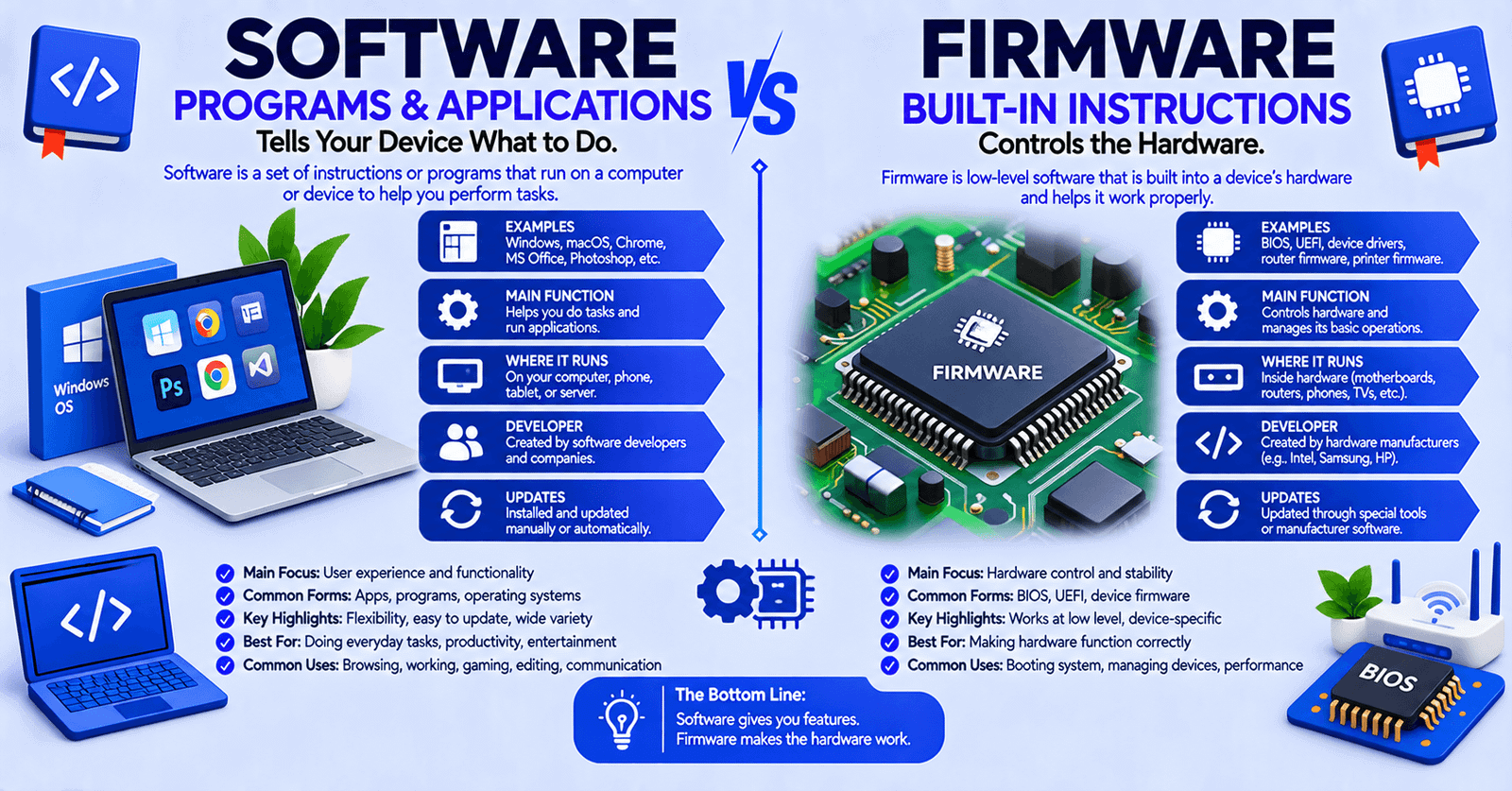

Software and firmware are both made of instructions that tell computing devices what to do, so the terms are easy to confuse. The important distinction is that firmware is actually a type of software, but it is designed to work closely with specific hardware and provide low-level control or essential device functions.
Software is the broader category. It includes operating systems, applications, utilities, and other programs. Firmware is specialized software embedded in a device and closely tied to the hardware it controls.
Understanding this difference helps explain why updating a laptop application is usually different from updating a router’s firmware or a computer’s BIOS/UEFI.
Quick Answer
Software is a broad term for programs and instructions used to operate computers and perform tasks, while firmware is a specialized type of software embedded in or closely associated with hardware to control its basic functions.
The simplest rule is:
All firmware is software, but not all software is firmware.
For example, Microsoft Word and Google Chrome are software applications, while BIOS/UEFI on a computer motherboard is firmware. Firmware helps hardware initialize and operate correctly, while ordinary software generally provides system-level or user-facing functionality.
Software vs Firmware at a Glance
| Feature | Software | Firmware |
| Basic meaning | Broad category of computer programs | Specialized software closely tied to hardware |
| Main purpose | Performs tasks, manages systems, or provides applications | Controls or initializes specific hardware |
| Hardware relationship | Usually less tightly bound to particular hardware | Strongly tied to particular hardware |
| User interaction | Often directly used by people | Usually works behind the scenes |
| Examples | Windows, Linux, Chrome, Photoshop | BIOS, UEFI, router firmware, device firmware |
| Storage | SSD, HDD, flash storage, and other media | Commonly nonvolatile memory such as flash or ROM |
| Updates | Often frequent | Usually less frequent, though modern firmware may update regularly |
| Modification | Usually easier | Often more sensitive and device-specific |
| Failure risk | Usually recoverable through reinstalling | A failed update can potentially make a device unusable |
The table describes common characteristics rather than absolute rules. Modern firmware can be updated, and software can also be closely tied to particular hardware.
What Is Software?
Software is a collection of programs, instructions, and related code that tells a computer or electronic system how to perform operations.
Software is a broad category. It includes both system-level programs and applications that users interact with.
Examples include:
- Windows
- macOS
- Linux
- Android
- Google Chrome
- Microsoft Word
- Adobe Photoshop
- Video editing applications
- Database systems
- Security software
- Business applications
Software can perform many different jobs. An operating system manages system resources and provides a platform for applications, while application software performs tasks such as browsing the web, editing documents, playing games, or processing images.
Unlike firmware, software is generally designed to be relatively flexible. Users can often install, remove, replace, configure, or update it without changing the physical hardware.
Example
When you install Google Chrome on a laptop, you are installing software that performs a user-facing function: web browsing.
When you uninstall it, the laptop’s basic hardware does not stop functioning.
What Is Firmware?
Firmware is a specialized type of software that is closely associated with particular hardware.
Its job is commonly to provide low-level instructions that allow a device or hardware component to initialize, communicate, or perform its essential functions.
Examples include:
- BIOS or UEFI firmware on a computer motherboard
- Router firmware
- Printer firmware
- Camera firmware
- SSD firmware
- Hard-drive firmware
- Firmware in USB devices
- Firmware in embedded systems
- Firmware in many smart devices
TechTarget describes firmware as software embedded into hardware that provides basic machine instructions and low-level control for the hardware.
Example
When you turn on a computer, motherboard firmware such as UEFI can initialize hardware and begin the startup process before the operating system takes over.
You normally do not interact with that firmware in the same way you interact with Chrome, Word, or a video-editing application.
What Is the Difference Between Software and Firmware?
The fundamental difference is how the code is used and how closely it is tied to hardware.
Software is the broader category and can serve many purposes. Firmware is specialized software intended to provide essential or low-level functionality for particular hardware.
Consider a Wi-Fi router.
Its firmware helps control the router’s hardware and provides the underlying functionality required for the device to operate.
Its broader software environment may provide configuration interfaces, network services, management functions, or other features.
The distinction is therefore not:
software = flexible code, firmware = permanent code
That is too simplistic.
A better distinction is:
Software is a broad category of programs; firmware is software designed around the operation of particular hardware.
Modern firmware can be stored in updateable flash memory and receive new versions, so firmware is not necessarily permanently unchangeable.
Why Is Firmware Considered Software?
Firmware is considered software because it consists of executable instructions and code.
The word firmware describes the role and relationship of that software rather than creating a completely separate class of computing instructions.
A useful way to remember the relationship is:
Software
→ Firmware is one specialized type of software
For example:
- Chrome → software
- Microsoft Word → software
- Windows → software
- BIOS/UEFI → firmware, and therefore software
- Router firmware → firmware, and therefore software
So asking whether firmware is software has a straightforward answer:
Yes. Firmware is software, but the term “firmware” tells you that the software is closely associated with particular hardware.
When to Use the Term “Software”
Use software when referring generally to programs or applications that perform tasks on a computing system.
For example:
I installed new software on my laptop.
The company develops accounting software.
The software needs an update.
Windows is system software.
We use video-editing software to create the presentation.
The term is broad enough to include many different types of programs.
When to Use the Term “Firmware”
Use firmware when referring to specialized code that is embedded in or closely associated with a hardware device.
For example:
The router needs a firmware update.
The motherboard firmware controls the initial startup process.
The manufacturer released new firmware for the camera.
Updating the SSD firmware fixed the compatibility problem.
The word is particularly useful when the software’s relationship with the physical device matters.
Software and Firmware in Real Examples
Example 1: Laptop
A laptop may contain:
- UEFI firmware
- Windows or Linux
- Device drivers
- Applications
UEFI helps initialize the machine and start the operating system. Windows manages the computer after startup, while applications allow the user to perform specific tasks.
Example 2: Router
A router has hardware containing specialized firmware.
That firmware helps the router perform its fundamental functions.
The router may also provide a web interface or mobile application through which users configure settings.
The important point is that the router’s firmware is not equivalent to a typical application such as Microsoft Word.
Example 3: Printer
A printer can contain firmware responsible for controlling its hardware.
A computer may then use printer software or a device driver to communicate with it.
This is why firmware, drivers, and software are related but not interchangeable terms. HP specifically distinguishes firmware from drivers and general software in its support documentation.
Example 4: Smartphone
A smartphone contains several layers of technology.
It can include:
- Hardware
- Firmware
- Operating system
- Applications
Your camera app is software.
The operating system is software.
Low-level code associated with the device’s hardware can be firmware.
These components work together rather than existing as completely isolated technologies.
Firmware vs Operating System
It is an operating system are both software, but they generally have different roles.
Firmware
It is closely associated with hardware and commonly handles low-level initialization, control, or device-specific functionality.
Operating system
An operating system such as Windows, Linux, macOS, or Android manages system resources and provides an environment in which applications can run.
A simplified relationship is:
Hardware → Firmware → Operating System → Applications
This is a useful mental model, but real systems can be more complicated. Some devices have multiple firmware components, and hardware can interact with software through drivers and other system layers.
Firmware vs Driver
A device driver is also software, but it has a different role from firmware.
A driver generally helps an operating system communicate with a particular hardware device.
For example:
- Firmware controls or initializes functions within the hardware.
- A driver allows the operating system to communicate with that hardware.
- Applications use the operating system and other software to provide functionality to the user.
HP summarizes the distinction by describing a driver as software used by the operating system to work with a hardware device, while firmware consists of instructions stored on hardware-related chips.
Simple rule
Firmware: helps the hardware function.
Driver: helps the operating system communicate with hardware.
Application software: helps the user perform a task.
Firmware Updates vs Software Updates
Both firmware and software can be updated, but the process and consequences can differ.
Software updates
Software updates commonly:
- Fix bugs
- Improve performance
- Add features
- Patch security vulnerabilities
- Improve compatibility
For example, your browser may automatically download a new version.
Firmware updates
Firmware updates can:
- Fix hardware-related bugs
- Improve device stability
- Add device capabilities
- Improve compatibility
- Patch security vulnerabilities
- Change how hardware behaves
Manufacturers can distribute firmware updates in different ways. Some devices allow automatic or over-the-air updates, while others require users to download and install firmware manually.
Because firmware is closely connected to device operation, a failed firmware update can sometimes cause serious problems, including bricking the device.
Is Firmware Permanent?
Not necessarily.
This is one of the most common misconceptions.
Older firmware was often stored in memory that was difficult or impossible to rewrite. Modern devices commonly use updateable nonvolatile memory such as flash memory.
TechTarget notes that firmware stored in flash memory can be updated, while firmware stored in certain forms of ROM or one-time programmable memory may not be rewriteable.
So the better definition is:
Firmware is hardware-specific software, not necessarily permanently unchangeable software.
Common Mistakes About Software and Firmware
Incorrect:
Firmware and software are completely different things.
Correct:
Firmware is a specialized type of software.
Why: Firmware belongs within the broader category of software.
Incorrect:
All firmware is permanent.
Correct:
Firmware is usually embedded or closely associated with hardware, but many modern devices allow firmware to be updated.
Why: Flash-based firmware can be rewritten.
Incorrect:
Software is always stored on a hard drive, while firmware is always stored in ROM.
Correct:
Software and firmware can use different types of storage, and firmware can be stored in updateable flash memory.
Why: Storage technology varies by system.
Incorrect:
Windows is firmware.
Correct:
Windows is an operating system and therefore software.
Why: An operating system is not automatically firmware simply because it controls hardware resources.
Incorrect:
A device driver and firmware are the same thing.
Correct:
A driver and firmware are both types of software, but they serve different roles.
Why: Drivers primarily provide an interface between an operating system and hardware, while firmware is closely tied to the hardware’s own operation.
Common Collocations With Software and Firmware
Software collocations
- install software
- update software
- software application
- system software
- application software
- software development
- software program
- software bug
- software security
- software update
Firmware collocations
- firmware update
- firmware version
- firmware upgrade
- embedded firmware
- firmware security
- firmware bug
- firmware image
- device firmware
- motherboard firmware
- router firmware
These phrases reflect how the terms are normally used in technical writing.
Can Software and Firmware Be Used Interchangeably?
Usually not, even though firmware is software.
The words have different levels of specificity.
You can describe firmware as software in a general sense:
The router contains software that controls its hardware.
But if the hardware-specific role is important, firmware is the more precise term:
The router needs a firmware update.
Calling everything “software” is not necessarily wrong, but it removes useful information about how that code relates to the hardware.
How to Remember the Difference
Think of the terms this way:
Software = the broad category.
Firmware = specialized software closely tied to hardware.
A simple mental picture is:
Hardware
↓
Firmware
↓
Operating system / system software
↓
Applications
This is a simplified model, but it provides a useful starting point for understanding the relationship.
Which One Should I Use?
Use software when you’re talking about programs generally.
If you mean a program used to perform a task → Software
Examples:
- Web browser
- Word processor
- Video editor
- Accounting program
If you mean code closely tied to a particular device’s hardware → Firmware
Examples:
- BIOS/UEFI
- Router firmware
- Printer firmware
- SSD firmware
- Camera firmware
If you mean software that lets an operating system communicate with hardware → Driver
This three-way distinction prevents many common technology terminology mistakes.
X or Y? Practice Examples
Choose software or firmware.
- The router manufacturer released a new ______ version.
- I installed photo-editing ______ on my computer.
- The motherboard’s ______ was updated to support the new processor.
- Microsoft Word is application ______.
- The camera manufacturer released new ______ to improve device stability.
- Google Chrome is ______.
- The device’s embedded ______ controls important hardware functions.
- The company develops business management ______.
Answers
- Firmware
- Software
- Firmware
- Software
- Firmware
- Software
- Firmware
- Software
The key is not simply whether the code is “inside” a device. Ask whether the term is being used for general-purpose/system/application functionality or for specialized code closely associated with particular hardware.
Frequently Asked Questions
Is firmware a type of software?
Yes. Firmware is a specialized type of software designed to provide low-level or device-specific functionality closely associated with hardware.
What is the main difference between software and firmware?
The main difference is their relationship with hardware. Software is the broader category of programs, while firmware is specialized software closely tied to particular hardware and often responsible for low-level device functions.
Is BIOS software or firmware?
BIOS is firmware. More precisely, BIOS is a type of system firmware used during computer startup. Modern computers commonly use UEFI firmware instead of traditional BIOS.
Is UEFI firmware?
Yes. UEFI is firmware that provides the startup environment and hardware initialization functionality on modern computers.
Can firmware be updated?
Yes. Many modern devices use updateable firmware, particularly firmware stored in flash memory. Manufacturers release updates to fix bugs, improve security, increase compatibility, or add functionality.
Is firmware stored in ROM?
It can be, but not all firmware is stored in traditional ROM. Modern firmware is frequently stored in flash memory, which allows it to be updated.
Is Windows firmware?
No. Windows is an operating system, which is software. A Windows computer can also contain firmware, such as UEFI, but Windows itself is not firmware.
Is a device driver firmware?
No. A driver is software that helps an operating system communicate with hardware. Firmware is more closely associated with the operation of the hardware itself.
Can a firmware update damage a device?
A failed or corrupted firmware update can potentially make a device unusable, a condition commonly called bricking. This is why firmware updates can require more care than ordinary application updates.
Are software and firmware the same thing?
No, but they are closely related. Firmware is software, but the term firmware identifies software that has a specialized relationship with particular hardware.
Conclusion
The difference between software and firmware is mainly about scope and hardware relationship. Software is the broad category that includes operating systems, applications, utilities, and other programs. Firmware is a specialized form of software closely tied to particular hardware and commonly responsible for low-level control, initialization, or essential device functions.

Sajid Ali is an English language educator and content specialist with 7+ years of teaching experience. He holds master’s degrees in Information Technology and Education from the Virtual University of Pakistan and writes SEO-optimized, learner-friendly vocabulary content for diffari.com.